Deadline Roulette

I didn’t mean to write about peer review again. Two things I never mean to write about are Peer Review and Impact Factors, but being an editor provides a privileged viewpoint on both so I seem to keep coming back to them. And here we go again:

This time the spur is a new paper in Scientific Reports that caught my eye called “How Important Tasks are Performed: Peer Review“. I wrote last month about the psychology of setting deadlines for referees

and so this line in the abstract made me sit up and take notice:  “the time a referee takes to write a report on a scientific manuscript depends on the final verdict”. The phrase “a Deadline-effect” also appears in the abstract. My interest was piqued. Did the authors have real data? Were they going to conclude that setting different length deadlines could change the decision on a manuscript?
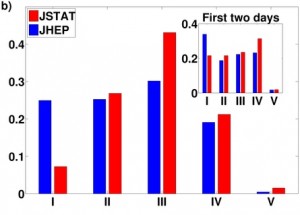
Fractions of various decision: classes accepted (I), accepted with minor revision (II), to be revised (III), rejected (IV), not appropriate (V) from all reports (as an inset the same for short-duration processes) . Adapted from Figure 2b of ref. 1

Fractions of various decision: classes accepted (I), accepted with minor revision (II), to be revised (III), rejected (IV), not appropriate (V) from all reports (as an inset the same for short-duration processes) . Adapted from Figure 2b of ref. 1

The authors have looked at data from two journals: Journal of High Energy Physics (JHEP) and the Journal of Statistical Mechanics: Theory and Experiment (JSTAT). The journals don’t really matter, what is important is that they have access to data from these journals of every interaction with referees giving times for responses to review requests, how long it took them to return reports and what the decision was (on the paper). From this they can do lots of plotting of decision times and see that things seem to be covered by Poisson statistics which means that they can do some mathematical modelling. They also see that for those reports that come back fast, that is within a day, there is a much higher proportion of clear cut decision: Accept as is, or Reject.

I don’t think that either of those observations will surprise many people but there is more. For a start the two journals have different reviewing deadlines. JSTAT asks for reviews in 3 weeks, JHEP in 4. Both slower than Nature Protocols but then this is physics, a foreign country where they do things differently. Their data don’t support my comments on deadlines though because the shape of the distribution of return times for reviews is the same for both journals just that JHEP’s is spread over a longer scale.

Now because the distributions they get are Poisson looking they can be modelled with a series of stochastic steps. Referees are seen as people who spend their days doing little bits of action (sub tasks) each one taking about 10 minutes, that add up to a whole task. Every 10 minutes (approximately) the referee chooses what subtask to do based on importance of the overall tasks.  If that were all though the distributions wouldn’t be as they are, there would be power-laws involved and a long tail of reports that take a very long time to be completed. What stops this happening is the ‘Deadline-effect’. Because there is a deadline set on the task the referees know they have to spend a set amount of time before the deadline on the report. The clear-cut reports come in more quickly not because they have fewer sub-tasks but rather because the referees assess from the outset that these are going to be ‘easier’ sub-tasks to complete and so are likely to perform them with higher probability. Always pick the low hanging fruit first!

I can’t quite decide what take home message I have from this paper. It certainly suggests that clear deadlines and ruthless chasing are needed to get reports from referees. Perhaps though there is also a lesson for authors: If you want to get your paper reviewed swiftly, make it as easy as possible to review. That it took almost 3 months for this paper to pass through review might suggest that is a conclusion the authors didn’t draw for themselves.

1. Hartonen, T. & Alava, M. J. How important tasks are performed: peer review. Scientific Reports 3, 1679 doi:10.1038/srep01679

Two weeks is a long time in science publishing

Last week we got an email from one of our referees, who we were chasing for a report, asking a very common question not only for us on Nature Protocols but for editors in general. We ask referees to turn in their reports in 10 days, or let usknow if they need longer. “Why” asked our referee “10 days?”. He (or possibly she) went on to point out that Protocols aren’t the most time sensitive of publications and journals like Nature and Cell ask for 14 days for reviewing. Who does Nature Protocols think it is to be demanding such fast turn around times?

These are completely fair points, and the answer lies not in an overinflated opinion of our importance, but rather the psychology of the journal/referee relationship. A Protocol doesn’t have quite the same time pressure that primary research papers do, although many of our authors don’t seem to agree.

To start to answer this question there isn’t any real difference between 10 days and 14 days. Essentially editors ask for a return of a referees report in 2 weeks. The precise number reflects whether we are talking about calendar or working days; what we all mean is 2 weeks. Why not say 2 weeks then? Well we’ve found that some referees read 2 weeks and hear “2 clear weeks” or “the end of the week after next”, and so 2 weeks gets interpreted as 3.

Why 2 weeks? This is a mainly pragmatic call unrelated to how fast we actually need the reports back. Sure we aren’t going to worry too much if it takes 3 weeks or even a bit more to get a report back. But we do want to get a report back and we don’t want prospective referees to take on reviews if there isn’t a realistic chance of them getting the review done in less than a geologic age. Bitter experience has taught us editors that 2 weeks is about the longest time over which an average scientist can make an accurate estimation of their workload.

When you ask for 2 weeks the potential referees thinks “I’m not crazy busy at the moment, I can manage that” and chances are that the report will get written, albeit delayed by circumstances beyond their control, in something . If you say more than 2 weeks referees will think “well I’m crazy busy at the moment but it should get better soon so I should be able to do the review in a couple of week’s time” and they say ‘yes’. More than likely though things will turn up and things will still be ‘crazy busy’ in 2 weeks, and in another 2 weeks, and in another and so on. We end up doing what we hate, which is hassling referees who are helping us out of nothing more than altruism.

That’s probably more about the psychology of the editor/referee relationship than you need to know, but it does seem to be a counter-intuitive fact that the more time you offer a referee to do their review, the less likely it is that the referee will be able to complete the review anywhere close to that deadline.

So when an editor asks a researcher to review a paper in 10/14 days they are asking please can you review this paper in approximately 2 weeks, because if you can’t commit to reviewing within half a month then you shouldn’t be deceiving yourself; you haven’t time to review it at all.

A story from the Nature Protocols Discussion Forum

Nature Protocols likes to be part of the on-line community. In addition to the main journal (which, in 2006, was one the first NPG titles to have commenting on its articles), we have the Protocol Exchange, Stepwise (the blog), a twitter account and – the subject of today’s story – the Nature Protocols Discussion Forum.

The Discussion Forum was set up to create a place where people could post questions about methodological problems encountered in their research or discuss various methods and techniques. Dot is the main person looking after the forum, so it is slightly unusual (and a little exciting) for me to take part of any of the discussions. Browsing through the topics, I found that broadly speaking there are two types of questions that seemed to come up frequently on the forum:

(1)  I am thinking of doing this experiment, does any one have a good protocol or some advice on how I should go about it  (e.g. trying to generate a site specific acetylation antibody)?

(2) I have done this experiment, and it all went horribly wrong, does anyone know why? (e.g. Galactose induction of Yeast cells)

About a week ago, a researcher emailed protocol.exchange<at>nature.com with some Type 1 queries regarding the electrophoresis of DNA and I helped him by posting a topic  on the forum.


We alerted our twitter followers to the cause…


…. and three very helpful researchers replied.


While it is possible that we might have reached the “happily ever after” state for this forum topic,  “Should I use agarose or polyacrylamide?” and “How long should the gel be?” may actually have the kind of answers that starts “It depends…”.

If you have any thoughts on the subject, or know of a good open access resource that discusses any “It depends…” aspects of the DNA electrophoresis question please do join the discussion!!


Exchange Protocols: What are they and how are they made?

What are the characteristics of an Exchange Protocol?

I have created a short screencast highlighting some essential features:

– each Exchange Protocol is associated with a Lab Group

– each has a DOI

– the Procedure is a series of numbered steps in the active tense

– you can add a query for the author, or other comment

– you can add the protocol to a list of favourites

You can browse for other Exchange Protocols by clicking here.

How do you create an Exchange Protocol

The first time you come to share a protocol, this will be a two stage process, both of which are very easy to do.

Stage 1 is “Creating a labgroup”, and Stage 2 is “Creating the protocol”.

I have made two screen casts that show how these steps are achieved.

How to create a lab group starting from https://www.nature.com/protocolexchange/

How to create the protocol starting from https://www.nature.com/protocolexchange/protocols/new

Are there any needles in this haystack?

With increasing volumes of information being published we are becoming ever more reliant on good:

(1) Search engines, and

(2) Post-publication reviews (e.g. in the form of Featured articles, News and Views pieces, blog-posts, comments and ratings).

In this post, I would like to introduce you to the Protocols Browse function.

Google and PubMed are, I think, the best resources for finding information when you know (almost) exactly what you are looking for. There are times, though, when it is useful to browse through the literature to uncover things that might be interesting or useful. Nature Protocols and the Protocol Exchange share quite a powerful Browse function. Unfortunately it suffers slightly from not being an integral part of either home page and therefore I have these paranoid thoughts that users of our site are not even aware that it exists!

In a small attempt to address this, I have created a few very short screencasts to introduce people to Browsing Protocols.

The first shows an example of how to access the Browse function from the Nature Protocols homepage (https://www.natureprotocols.com/)

The second shows an example of how to browse community contributed protocols from the Protocol Exchange (https://www.nature.com/protocolexchange/protocols/)

Update on inserting images into Exchange Protocols

A while ago, I wrote a post on how to insert images into the main text of Exchange Protocols.

I would like to write a quick update on this, because there is a slightly more elegant solution when trying to insert images that happen to be smaller or larger than the page-width.

1| Prepare your figure. In order for it to show as an image it has to be a jpeg, png or bitmap file. Unfortunately tif files will NOT show as images. The framed page is 560 pixels wide.

? TROUBLESHOOTING

2| Assuming that you are in the process of sharing a protocol, upload your figure by going to the “Images and Attachments” page. Notice that both the Name (e.g. Figure 1) and the Title (Overall heading) are required fields.

3| Navigate to the section of the protocol where you would like to add the figure, and click on the link: “How do I enter formatted text, symbols, links and images?”, and expand the section: "URLS for files uploaded via the “Images and Attachments” page.

4| Copy the link for the image that you are interested in inserting including the exclamation marks, and paste it into, for example, the Introduction. (Use “Control-C” for copy, and “Control-V” for paste)

5| Save the changes, and preview your protocol. If the image is displaying perfectly, then your job is done!

? TROUBLESHOOTING

TROUBLESHOOTING

Step 1: My uploaded file is not showing up as an image

If you file is not one of the “image file types”, you can usually convert it to one.

For tiff files, my favoured method is to open the image in PAINT (Start > All programs > Accessories > Paint), and then “Save As” a png file.

For pdf files, I usually open the pdf and select the image using the snapshot tool. I then “paste” it into Paint and “Save As” a png file.

Step 5: The images is too wide for the screen or you think that it is too big

You can fix this by using the following bit of html:

<img src=" webaddress for the image " alt="Alternative text for your image" width="560" height="228" />

For example:

<img src=" https://www.nature.com/protocolexchange/system/uploads/1927/original/DSC_2524.JPG?1315930505 " alt="Alternative text for your image" width="426" height="285" />

Will result in:

Alternative text for your image

If you wanted to insert the thumbnail with a link to the main figure, then you could insert the following html into the text: <a href="https://url/for/the/fullsize/image"> <img src="https://url/for/the/thumbnail/image" > </a>

For example:

<a href="https://www.nature.com/protocolexchange/system/uploads/1927/original/DSC_2524.JPG?1315930505 "> <img src="https://www.nature.com/protocolexchange/system/uploads/1927/thumbnail/DSC_2524.png?1315930505 " > </a>

Will result in:

I am not going to go through the sums that you need to do to work out the numbers for the width and height of desired output, but there might be some value in mentioning ways of finding out the dimensions of your original image.

– If you are already in PAINT, then you can go to “Image > Attributes”.

– If have the full size image open in your browser, the you can right-click on the image. In Internet Explorer go to “Properties”, in firefox go to “Page info”, and in chrome go to “Inspect element”.

From Word document to clean html

Recently I tweeted that https://word2cleanhtml.com/ was the thing that had been missing from my life. I am not going to go into the reasons why it would be just that important to Me Personally, but I am excited enough to write a blogpost about it.

▲ Aside: Don’t forget to follow @NatureProtocols on https://www.twitter.com!!

♫ Here we go! Are you paying attention!

This Blogpost has been written in Word. The formatting has not been added using any of the weird stars and underscores that you normally find yourself using, and was achieved in six easy steps:

  1. Write the post with the desired formatting.
  2. Go to https://word2cleanhtml.com/index.html and paste in the text (Check the boxes “Remove empty paragraphs”, “Replace smart quotes with ascii equivalents”, “Indent with tabs, not spaces” and “Replace non-breaking spaces with ordinary spaces”).
  3. Copy the resulting clean html into a new Word document.
  4. Find and replace all paragraph marks with “nothing”.
  5. Find and replace all tabs with “nothing”.
  6. Paste the resulting text into the text field in movable type.

Can we even do a table??

Step Number

Problem

Solution

4

You can’t quite work out what to put in the “Find what” field.

Go to “More”, “Special” – the Paragraph Mark should be the top entry, and should be ^p.

6.

When you preview the document, the page layout is completely screwed up.

Every <p> needs to have a corresponding </p>. Similarly with <div> and </div>. Check that this is indeed thecase. A common “thing” is that you will not have copied and pasted the first “<” or the final “>”. If it just looks too complicated, it is worth either repeating the copy-and-paste steps OR just adding another </div> at the end of the text andhoping for the best.

And lastly: You could use this tool when uploading your protocols on the Protocol Exchange and (fingers crossed) your beautiful formatting will be preserved without anyone having to break a sweat.

…………………

Word2Cleanhtml was written by Olly Cope.

…………………

This post has been edited since it was originally published; the whole things works even better if you tick the “Indent with tabs, not spaces” box in https://word2cleanhtml.com/index.html

A Finer Point relating to Nature Protocols RSS feeds

Following on from the previous post, I would like to show you what else you can do to customise your Nature Protocols RSS feeds.

If you have a look at the list of RSS feeds for the categories, you will notice that all of the links have “.rss” between “protocols” and the question mark.

For example:

Spectroscopy

https://www.nature.com/protocolexchange/protocols.rss?protocol_search%5Bfacets%5D%5Bcategory%5D=Spectroscopy

Structural Biology

https://www.nature.com/protocolexchange/protocols.rss?protocol_search%5Bfacets%5D%5Bcategory%5D=Structural+biology

Synthetic Chemistry

https://www.nature.com/protocolexchange/protocols.rss?protocol_search%5Bfacets%5D%5Bcategory%5D=Synthetic+chemistry

What is really cool, is that you can make an rss feed from any search term (or group of search terms) accessible from the Browse page.

For example, if you are very interested in NMR, you might search for this term within the Structural biology category, insert “.rss” into the webaddress and then copy the resulting link into your feedreader!

Webaddress for the search results:

https://www.nature.com/protocolexchange/protocols?commit=Go&protocol_search%5Bfacets%5D%5Bcategory%5D=Structural+biology&protocol_search%5Bq%5D=NMR

Webaddress for the RSS feed:

https://www.nature.com/protocolexchange/protocols.rss?commit=Go&protocol_search%5Bfacets%5D%5Bcategory%5D=Structural+biology&protocol_search%5Bq%5D=NMR

Another example application:

If you are collaborating with other research teams and want to be able to easily group protocols that “belong” to the collaboration, you could agree on a unique connecting word or phrase to add to the keywords when uploading your Exchange Protocols. You would be able to use this term to easily find the protocols, plus you could have an RSS feed to let you know when more protocols had been added.

RSS Feeds at the Category Level – Hoorah!!

Ever since I found out about RSS feeds (and igoogle), I have looked at our home page and thought: “Wouldn’t it be nice if there were RSS feeds at the category level?”.

So if this is the one thing that has been missing from your life all these years, I have some good news: You can do it now!

Unfortunately, we don’t have the little orange buttons yet, but if you copy one of the links below into your feedreader it should work.

Biochemistry

https://www.nature.com/protocolexchange/protocols.rss?protocol_search%5Bfacets%5D%5Bcategory%5D=Biochemistry

Cell biology

https://www.nature.com/protocolexchange/protocols.rss?protocol_search%5Bfacets%5D%5Bcategory%5D=Cell+biology

Cell culture

https://www.nature.com/protocolexchange/protocols.rss?protocol_search%5Bfacets%5D%5Bcategory%5D=Cell+culture

Chemical modification

https://www.nature.com/protocolexchange/protocols.rss?protocol_search%5Bfacets%5D%5Bcategory%5D=Chemical+modification

Computational biology

https://www.nature.com/protocolexchange/protocols.rss?protocol_search%5Bfacets%5D%5Bcategory%5D=Computational+biology

Developmental biology

https://www.nature.com/protocolexchange/protocols.rss?protocol_search%5Bfacets%5D%5Bcategory%5D=Developmental+biology

Epigenomics

https://www.nature.com/protocolexchange/protocols.rss?protocol_search%5Bfacets%5D%5Bcategory%5D=Epigenomics

Genetic analysis

https://www.nature.com/protocolexchange/protocols.rss?protocol_search%5Bfacets%5D%5Bcategory%5D=Genetic+analysis

Genetic modification

https://www.nature.com/protocolexchange/protocols.rss?protocol_search%5Bfacets%5D%5Bcategory%5D=Genetic+modification

Genomics

https://www.nature.com/protocolexchange/protocols.rss?protocol_search%5Bfacets%5D%5Bcategory%5D=Genomics

Imaging

https://www.nature.com/protocolexchange/protocols.rss?protocol_search%5Bfacets%5D%5Bcategory%5D=Imaging

Immunological techniques

https://www.nature.com/protocolexchange/protocols.rss?protocol_search%5Bfacets%5D%5Bcategory%5D=Immunological+techniques

Isolation, Purification and Separation

https://www.nature.com/protocolexchange/protocols.rss?protocol_search%5Bfacets%5D%5Bcategory%5D=Isolation%2C+Purification+and+Separation

Metabolomics

https://www.nature.com/protocolexchange/protocols.rss?protocol_search%5Bfacets%5D%5Bcategory%5D=Metabolomics

Microbiology

https://www.nature.com/protocolexchange/protocols.rss?protocol_search%5Bfacets%5D%5Bcategory%5D=Microbiology

Model organisms

https://www.nature.com/protocolexchange/protocols.rss?protocol_search%5Bfacets%5D%5Bcategory%5D=Model+organisms

Nanotechnology

https://www.nature.com/protocolexchange/protocols.rss?protocol_search%5Bfacets%5D%5Bcategory%5D=Nanotechnology

Neuroscience

https://www.nature.com/protocolexchange/protocols.rss?protocol_search%5Bfacets%5D%5Bcategory%5D=Neuroscience

Nucleic acid based molecular biology

https://www.nature.com/protocolexchange/protocols.rss?protocol_search%5Bfacets%5D%5Bcategory%5D=Nucleic+acid+based+molecular+biology

Pharmacology

https://www.nature.com/protocolexchange/protocols.rss?protocol_search%5Bfacets%5D%5Bcategory%5D=Pharmacology

Plant Biology

https://www.nature.com/protocolexchange/protocols.rss?protocol_search%5Bfacets%5D%5Bcategory%5D=Plant+biology

Protein analysis

https://www.nature.com/protocolexchange/protocols.rss?protocol_search%5Bfacets%5D%5Bcategory%5D=Protein+analysis

Proteomics

https://www.nature.com/protocolexchange/protocols.rss?protocol_search%5Bfacets%5D%5Bcategory%5D=Proteomics

Spectroscopy

https://www.nature.com/protocolexchange/protocols.rss?protocol_search%5Bfacets%5D%5Bcategory%5D=Spectroscopy

Structural Biology

https://www.nature.com/protocolexchange/protocols.rss?protocol_search%5Bfacets%5D%5Bcategory%5D=Structural+biology

Synthetic Chemistry

https://www.nature.com/protocolexchange/protocols.rss?protocol_search%5Bfacets%5D%5Bcategory%5D=Synthetic+chemistry

Tissue Culture

https://www.nature.com/protocolexchange/protocols.rss?protocol_search%5Bfacets%5D%5Bcategory%5D=Tissue+culture

Toxicology

https://www.nature.com/protocolexchange/protocols.rss?protocol_search%5Bfacets%5D%5Bcategory%5D=Toxicology

Virology

https://www.nature.com/protocolexchange/protocols.rss?protocol_search%5Bfacets%5D%5Bcategory%5D=Virology

An introduction to Lab Groups

A feature of the new, improved Protocol Exchange site is that each protocol is associated with a Lab Group. A full list of these Lab Groups can be access from the Lab Groups tab.

outstanding labgroup 3.PNG

Lab groups can be:

1. Closed (all of the Lab Groups in the above example). This means that you can only become a member of the Lab Group if you are invited by the Lab Group Owner.

2. Accepting Requests (identified by the link “Apply to group”). This means that any user of Protocol Exchange can request to join this Lab Group, this application will be accepted or declined by the Lab Group Owner.

3. Open (identified by the link “Join group”). This means that any user of Protocol Exchange can join this group.

If you are a member of a Lab Group you can share protocols, or make a list of publications associated with the group by entering the DOIs for each article.

kurgan lab group.PNG

The Kurgan Lab, for example, has uploaded 1 protocol and listed 30 publications.

Most of the Lab Groups on our site are from Academic Institutions, but it is also possible for Commercial organisations to create a Lab Group and upload their protocols.

Two example of these are:

Targefect Transfection Group, Targeting Systems

biocision

When their protocols are listed, for example, on the Browse section, it is clearly marked that they are contributed by suppliers.

supplier and community.PNG

Another defining feature of the Lab Group is that you can upload a logo! The maximum allowed dimenstions are 200 X 100 pixels (width x height). I have made a list of the labgroups that have logos below; some of them are rather beautiful!

Sherwood’s Lab, Duke University

Sorger Lab, Harvard Systems Biology

Suga’s Lab (Hiroaki Suga), The University of Tokyo

Wehkamp Lab, IKP Stuttgart

Zaffran group, INSERM unit 910, Université de la Méditerranée

Guaza´s Lab, Cajal Institute, Madrid

Haseeb’s Lab (King Saud University, Riyadh, Saudi Arabia)

Kurgan Lab (University of Alberta)

Ren Lab, Oregon Health & Science University

Sanquin

Targefect Transfection Group, Targeting Systems

biocision

………………………………………………………..

More information about Lab Groups can be found in the About page.*

If you find that you have a protocol on the Exchange that was migrated from the old Protocols Network, and you want to get connected with the group that was automatically created, please do get in touch at: protocol.exchange@nature.com.