Bring on the box plots

Box plots are excellent for visualizing important core statistics of sample data. We hope that a new online plotting tool BoxPlotR will help encourage their wider use in basic biological research.
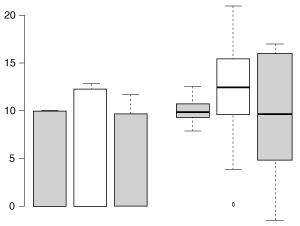
The same three samples plotted by bar chart (left) and box plot (right).

The same three samples plotted by bar chart with s.e.m. error bars (left) and Tukey-style box plot (right). The box plot more clearly represents the underlying data.

A bar chart is often a person’s first choice of plot type when they want to compare values. This is appropriate when the values arise from counting. But when the value is a mean or median of data points taken from a sample, a bar chart is usually inappropriate. As discussed in our March Editorial and the accompanying Points of View and Points of Significance columns, a “mean-and-error” scatter-type plot or a box plot are more appropriate for sampled data. In summary, we strongly recommend that box plots be used when you have at least five data points, but for samples with 3-5 data points mean-and-error plots are more appropriate.

Box plots are heavily used in biomedical research in which statisticians have historically had considerable input into study design and analysis. But although similar types and quantities of sample data also appear in basic research (such as that published in Nature journals) box plots are much less common than bar charts in these manuscripts. Last year in Nature Methods for example, ~80% of sampled data was plotted using bar charts.

Discussions we had with the community suggested that an impediment to using box plots instead of bar charts to graph sample data was due to limited support for box plots in plotting programs commonly used by researchers. It also became apparent that some software that did support the box plot was deficient in communicating to users what the different elements of the plot represented. As a result, strangely labeled box plots were showing up in published papers. At NPG we thought it would be useful to provide authors with a simple online tool they could use to generate basic box plots of their data for publication.

The origin of BoxPlotR
At the VizBi 2013 conference in Cambridge Massachusetts I mentioned NPG’s desire for such a tool at a breakout session chaired by Martin Krzywinski in which the participants, including a young researcher named Jan Wildenhain, discussed what the community needed to create better figures. I also happened to mention our interest in this to Michaela Spitzer while visiting her poster from the Juri Rappsilber and Mike Tyers labs showing how the R-package ‘shiny’ by RStudio can be used to easily convert R code (a popular scripting language for statistics) into a visual application for exploring data.

Later at the conference Jan approached me and said he was intrigued by our desire for someone to design a webtool to create box plots and that he was interested in working on such a project. I happily told him to get in touch with me after the conference so we could discuss it further.

Three weeks after the conference concluded I still hadn’t heard from Jan and was beginning to worry that he had decided not to pursue this. Then… a few days later, I received an email from Jan. Much to my surprise he provided a link to a highly functional tool that he and Michaela, through their own initiative, had gone ahead and created using shiny and R. What followed was a productive and rewarding period of discussion and development during which time Michaela incorporated additional functionality and made selected design changes. The tool appeared so well designed and functional that I encouraged them to submit it to Nature Methods for publication as a Correspondence. After incorporating additional functionality and changes based on comments brought up during peer review BoxplotR was ready for publication.
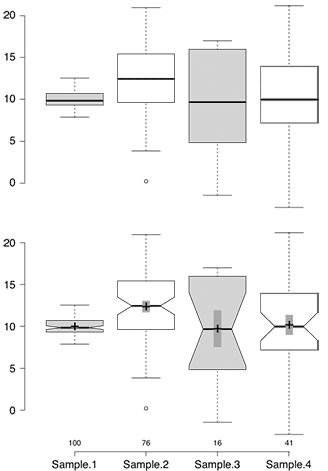
Sample BoxPlotR plots

Sample BoxPlotR plots. Top: Simple Tukey-style box plot. Bottom: Tukey-style box plot with notches, means (crosses), 83% confidence intervals (gray bars; representative of p=0.05 significance) and n values.

Launch of BoxPlotR
To accompany the publication and launch of BoxPlotR we thought it would be useful to provide some information and practical advice about box plots to our readers. Nils Gehlenberg, a former author of several Points of View articles with Bang Wong, agreed to resurrect that popular column for our February issue with an article on bar charts and box plots. Similarly, Martin Krzywinski and Naomi Altman agreed to delay our planned Points of Significance article on the two-sample and paired t-test and instead devote an article to box plots.

Seeing how the community responded to our interest in creating an online box plot tool and then working with them on this project has been a great experience. This never would have been possible without the initiative and talent of Jan and Michaela or the support they received from their PIs Mike and Juri. We hope both our authors and others find BoxPlotR useful and we encourage feedback. General comments can be made here on our blog or by emailing the journal. For specific bug reports and feature requests please see the contact information at https://boxplot.tyerslab.com.
Data visualization: A view of every Points of View column

We’ve organized all the Points of View columns on data visualization published in Nature Methods and provide this as a guide to accessing this trove of practical advice on visualizing scientific data.

As of July 30, 2013 Nature Methods has published 35 Points of View columns written by Bang Wong, Martin Krzywinski and their co-authors: Nils Gehlenborg, Cydney Nielsen, Noam Shoresh, Rikke Schmidt Kjærgaard, Erica Savig and Alberto Cairo. As we prepare to launch a new column in our September issue we felt this would be a good time to collect and organize links to all the Points of View articles together in one place to make it easier to navigate this wonderful resource that the authors have provided us. For the month of August we will be making all the columns free to access so everyone can benefit from this practical advice on data visualization.

This should not be the end of the Points of View column though. We will be inviting new visualization experts to author articles on new topics that have not been covered so far or which can be expanded on. This page will be continuously updated whenever a new article is published so stay tuned. If you have a suggestion for a topic you would like to see covered in a future points of view article please comment below.

Update of March 28, 2015: A PDF eBook of the 38 Points of View articles published between August 2010 and February 2015 is now available at the Nature Shop for $7.99 under the title “Visual strategies for biological data: the collected Points of View”. The article summaries below provide a nice overview of what is contained in that eBook collection.

. . . . . . . .

Introduction
Visualizing biological data – December 2012
Data visualization is increasingly important, but it requires clear objectives and improved implementation
The overview figure – May 2011
An economic overview figure to convey general concepts helps readers understand a research study

. . . . . . . .

Composition and layout
The design process – December 2011
Use good design to balance self-expression with the need to satisfy an audience in a logical manner
Figure design and layoutLayout – October 2011
Proper layout reveals the hierarchical relationship of informational elements
Gestalt principles (Part 1) – November 2010
Gestalt principles (Part 2) – December 2010
Exploit perceptual phenomena to meaningfully arrange elements on the page
Negative space – January 2011
Whitespace is a powerful way of improving visual appeal and emphasizing content
Salience to relevance – November 2011
Ensure that viewers notice the right content by making relevant information most noticeable
Elements of visual style – May 2013
Translate the principles of effective writing to the process of figure design
Storytelling – August 2013
Relate your data to the world around them using the age-old custom of telling a story

. . . . . . . .

Using colorUsing color in data visualizations
Color coding – August 2010
Choose colors appropriately to avoid bias and unwanted artifacts in visuals
Color blindness – June 2011
Make your graphics accessible to those with color vision deficiencies
Avoiding color – July 2011
Improve the overall clarity and utility of data displays by using alternatives to color
Mapping quantitative data to color – August 2012
Color is useful for compact visualizations of large data sets but must highlight salient features
Heat maps – March 2012
Color, clustering and parallel coordinate plots are essential for using heatmaps effectively

. . . . . . . .

Elements of a data figureElements of a figure
Typography – April 2011
Choose typefaces, sizes and spacing to clarify the structure and meaning of the text
Axes, ticks and grids – March 2013
Make navigational elements distinct and unobtrusive to maintain visual priority of data
Labels and callouts – April 2013
Figure labels require the same consistency and alignment in their layout as text
Plotting symbols – June 2013
Choose distinct symbols that overlap without ambiguity and communicate relationships in data
Arrows – September 2011
Use well-proportioned arrows sparingly and consistently as a guide through complex information

. . . . . . . .

Plot types
Bar charts and box plots – February 2014
Choose the appropriate plot according to the nature of the data and the task at hand
Sets and intersections – July 2014
Euler and Venn diagrams are appropriate for up to three sets but for greater numbers use more scalable plots
Heat maps – March 2012
Color, clustering and parallel coordinate plots are essential for using heatmaps effectively
Temporal data – Feb 2015
Use inherent properties of time to create effective visualizations
Unentangling complex plots – July 2015
Carefully designed subplots scaled to the data are often superior to a single complex overview plot
Pathways – January 2016
Apply visual grouping principles to add clarity to information flow in pathway diagrams
Neural circuit diagrams – March 2016
Use alignment and consistency to untangle complex neural circuit diagrams

. . . . . . . .

Improving figure clarityImproving figure clarity
Simplify to clarify – August 2011
Simplify your presentation to improve clarity
Design of data figures – September 2010
Improve figure decoding by using strong visual cues to encode data
Salience – October 2010
Use salience to differentiate graphical symbols and speed up figure reading
Points of review (Part 1) – February 2011
Examples of figure redesigns
Points of review (Part 2) – March 2011
Simple tips to improve pie chart, scatter plot and color scale data displays

. . . . . . . .

Multidimensional data
Visualizing multidimensional dataInto the third dimension – September 2012
3D visualizations are effective for spatial data but rarely for other data types
Power of the plane – October 2012
Combine 2D plots for effective visualization of multivariate data
Multidimensional data – July 2013
Visually organize complex data by mapping them onto familiar representations of biological systems

. . . . . . . .

Data exploration
Pencil and paper – November 2012
Quick sketches and doodles of data or models aids thinking and the scientific processVisualization for data exploration
Data exploration – January 2012
Create ‘slices’ of data to enhance the process of pattern discovery
Networks – February 2012
Choose your network visualization based on the patterns you are looking for
Heat maps – March 2012
Color, clustering and parallel coordinate plots are essential for using heatmaps effectively
Integrating data – April 2012
Combine visualizations of multiple data types to find correlations and potential relationships
Representing the genome – May 2012
Limit what is displayed based on the question being asked
Managing deep data in genome browsers – June 2012
Compaction and summarization help find patterns in overwhelming data
Representing genomic structural variation – July 2012
Use arcs, color, dot plots and node graphs to show relations between distant genomic positions

. . . . . . . .